
Creating a 77 MVP account is a straightforward process. New users should enter accurate information during registration and keep their login credentials private. This guide explains the basic registration process and important account-security precautions.
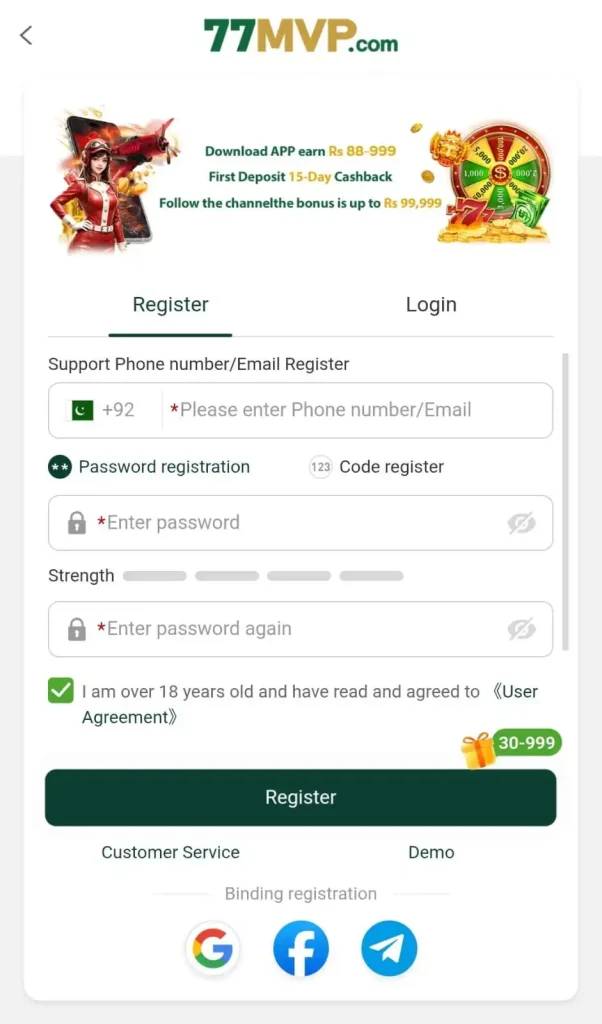
How to Register on 77 MVP
Follow these steps to create an account:
- Open the official 77 MVP website or app.
- Tap the Register or Sign Up button.
- Enter the required account information.
- Provide a valid mobile number if requested.
- Create a strong and unique password.
- Enter a referral or invitation code only if you have a valid one.
- Read and accept the applicable terms and conditions.
- Tap Register to submit your information.
- Complete phone or OTP verification if required.
- Once registration is complete, use your credentials to log in.
Information Required for Registration
The exact information requested can change depending on the current registration system. Users may be asked for basic details such as a mobile number, password, verification code, or other account information. Always provide accurate information, particularly if account verification is required later for payment or withdrawal requests.
Using a Referral or Invitation Code
If 77 MVP provides a referral program, new users may see an invitation or referral-code field during registration. Enter the code carefully before completing your account setup. Referral rewards, eligibility requirements, and promotional conditions may change, so check the latest program terms before expecting a particular reward.
OTP Verification
The platform may send a one-time verification code to confirm your mobile number. Enter the code only on the official registration screen. Never share your OTP with another person, including anyone claiming to be an agent or support representative.
Registration Problems and Solutions
If you cannot complete registration, check that:
- Your internet connection is working properly.
- Your mobile number and other details are entered correctly.
- Your password meets the required format.
- You have entered the correct OTP before it expires.
- You are using the latest version of the app.
- You have not already registered an account with the same details.
If the problem continues, use the platform’s official support channel rather than sharing account details with an unknown third party.
Account Security Tips
Use a password that you do not use on other websites or apps. Keep your password, OTP, verification codes, and payment credentials private. Avoid creating or accessing your account through unofficial APK files, suspicious links, or unknown agents.
Important Note
Registration does not guarantee bonuses, earnings, winnings, or successful withdrawals. If real-money gaming is available, review the platform’s current rules, payment conditions, age requirements, and responsible-gaming information before participating.
Final Words
The 77 MVP registration process should only take a few steps when the required information is available. Enter your details carefully, secure your account with a strong password, and complete any required verification through the official platform.